Case study · Personal project
Nagare
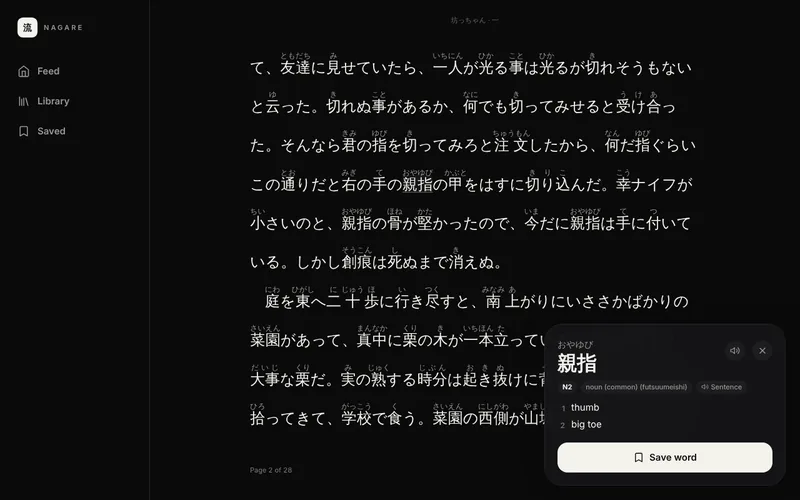
A Japanese reader that teaches as you read: import a book or pick a story, turn on furigana, and tap any word for its reading, meaning and JLPT level.
The problem
Reading real Japanese is some of the best practice there is, but every unknown word means leaving the text for a dictionary, and most study apps put drills and streaks ahead of reading. Nagare starts from the other end: the reader is the product, and study tools only exist to reinforce what you've read. There are no streaks, hearts or leaderboards.
What it does
- A library from N5 to N1: original graded readings written for Nagare at every level, Wikibooks graded readers, a shelf linking all 141 free Tadoku graded readers, and about 30 Aozora Bunko classics, from short stories to full novels like 坊っちゃん and こころ, each tagged with a level.
- Search Aozora Bunko: about 10,500 public-domain works, searchable by title or author in kanji or kana, fetched when you open one.
- Import a .txt, .epub or .pdf file; long books are split into chapters.
- A paged reader like an e-reader: turn pages by tapping the edges, swiping or with the arrow keys, in horizontal or vertical text, with the page number and minutes left in the chapter. An "Aa" panel sets the text size, spacing and page color, or switches to scrolling.
- Furigana you can switch on or off, and it remembers your choice.
- Tap any word for its reading, meaning, part of speech and JLPT level, and add it to your word list.
- Translate a sentence with a model that runs on your device.
- A swipeable sentence feed filtered by level (N5, N4, N3+), with a link to read the full story and a list of sentences you've saved. Every few swipes, a quiz card asks what a word means, taken from a feed sentence or your word list.
- Review saved words as spaced-repetition flashcards: answer Again, Hard, Good or Easy and see when each word comes back. A card on the Saved page shows how many are due.
- Listen to any sentence or word read aloud by the device's built-in Japanese voice.
- Continue reading from where you left off, down to the chapter and page.
- A desktop layout with a sidebar, wide shelves and a lookup panel beside the text; phones keep the app-style layout.
How it's built
Next.js and TypeScript, exported as a static site, so everything runs in the browser with no backend and no account. kuromoji.js splits text into words on the page. Lookups use a dictionary of about 22,000 common words built from JMdict, tagged with JLPT levels from an MIT-licensed word list; both files are generated ahead of time by Node scripts.
EPUBs are unzipped with JSZip, following the book's spine to get the chapters in order. PDFs are read with pdf.js, which only loads when a PDF is imported. The library, reading progress, word list and saved sentences live in IndexedDB. Read-aloud uses the browser's built-in Web Speech API with the device's Japanese voice, so there are no audio files to ship. A GitHub Actions workflow builds the site and publishes it to GitHub Pages.
Key decisions
Everything in the browser, for now
Splitting text into words, dictionary lookups and translation all run client-side, so there's no server to host. The plan is to move tokenizing to a server-side Sudachi service once accuracy, or accounts and sync, need a backend.
Furigana only over the kanji
Readings come from the tokenizer rather than the source text, and matching kana at the end of a word is split off, so in 食べる only 食 gets た and べる stays plain.
Leveling the classics honestly
Aozora Bunko has no JLPT grading, so a script reads each work, looks up every content word's JLPT level, and assigns the lowest level that covers 80% of the words it could classify. It also reports how much of the text falls outside every JLPT list (names, archaic forms, rare compounds), because that makes a text harder too. Native literature almost never reads as N5 or N4, so the classics start at N3.
Novels one chapter at a time
A novel can run to 300,000 characters, far too much to split into words and draw as one page. Aozora Bunko marks its headings, so those become chapter breaks, and the reader only ever processes the chapter you're on. Text without headings, like an imported .txt, is split into parts of about 10,000 characters at paragraph breaks. Progress is saved as the chapter plus how far into it you are, so reopening a book lands in the right place.
Text out of a PDF, without the furigana
Free graded readers like Tadoku's come as PDFs, and their license allows linking to them but not redistributing them, so Nagare bundles only a list of titles and links, and you import the PDF yourself. A PDF stores positioned runs of text rather than prose, so the importer rebuilds it: it drops furigana by font size (anything under three-quarters of the body text), splits two-page print spreads left then right, joins spaced-out characters, and skips page numbers, English notes and the how-to-read and credits pages.
Translation in a Web Worker
Sentence translation uses the opus-mt-ja-en model through transformers.js. In testing, the model's WebAssembly call could sometimes block for a very long time, and a timeout on the same thread can't interrupt that, so it runs in a worker that can be shut down after 20 seconds. The model is about 110 MB, so a request made while it's still downloading gets up to 10 minutes instead; an audit found the short timeout was killing the worker mid-download and starting the download over.
What's next
Next up:
- Vocabulary from each text: pull out the key words when a text is imported, ready to review.
- Kanji and grammar: decks for both, fill-in-the-blank practice, and an N5 to N1 progress view.
- Manga: import comic archives and use OCR, so tapping a speech bubble works like tapping text.
- Accounts and sync across devices.