Case study · Personal project
Privacy Blocker
A private, local-first tool for getting your personal information off data brokers and people-search sites, built for California residents.
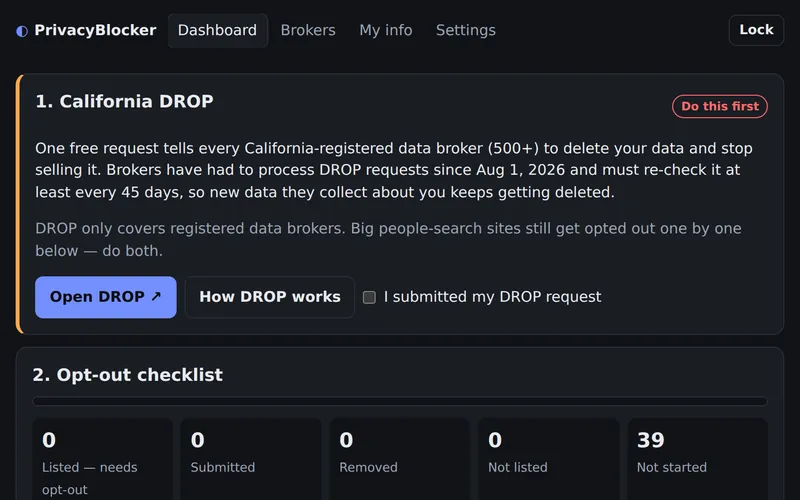
The problem
Data brokers sell names, addresses, phone numbers and relatives' details, and people-search sites publish them. Getting removed means a different form, email or phone call for each site, and doing it again when they list you again. Services that handle this for you usually cost money and need the very details you're trying to remove. Privacy Blocker keeps those details on your own device.
What it does
- California DROP first: the state's free portal sends one deletion request to every registered data broker (more than 500). The dashboard tracks whether you've submitted and stores your DROP ID.
- An opt-out checklist of about 40 people-search sites, marketing brokers and extra protections (credit freeze, Google's "Results about you", OptOutPrescreen, Do Not Call), in priority order. Each one lists its opt-out link, steps, what it requires and the sister sites it also covers.
- Status tracking with reminders: mark each site not listed, listed, submitted or removed. The dashboard shows when to check a submitted request (after about 14 days) and when to re-check for re-listing (about 90 days after removal).
- One-tap copy buttons for your name, opt-out email, address and phone numbers on every broker page.
- CCPA request emails citing Cal. Civ. Code §§ 1798.105, .120, .121 and .130, with only the details you choose to include.
- An email autopilot: a scheduled job that emails about 25 brokers a deletion request from your opt-out Gmail, opens their confirmation links, and sends you a summary.
How it's built
Plain HTML, CSS and JavaScript modules, with no build step and no third-party code. It installs to a phone's home screen as a PWA, and a GitHub Actions workflow runs the tests and publishes it to GitHub Pages.
The autopilot is a Python script that uses only the standard library, talking to Gmail over IMAP and SMTP, and runs on a schedule in GitHub Actions. Both halves are tested: the app with Node's built-in test runner, the autopilot with unittest.
Key decisions
Encrypted with your passphrase
Everything you enter is encrypted with a key derived from your passphrase (PBKDF2-SHA256 with 600,000 iterations, then AES-256-GCM, using the browser's Web Crypto API) and stored only in that browser. The key exists only in memory and is dropped when the vault locks, which happens automatically after 10 minutes idle. Encrypted backups move your progress between devices.
The app can't send your data anywhere
The page's Content Security Policy sets connect-src 'none', so the app itself can't make network requests. The only information that leaves is what you paste into a broker's form or send in an email.
The mailbox is the database
The autopilot keeps no records of its own: it finds the requests it already sent by searching your Sent mail, so nothing personal is ever written to the repository. Actions logs are public on a public repo, so it prints counts only, never names, addresses or email contents.
No dependencies
No packages in the app and only the standard library in the autopilot means no third-party code ever handles your personal details.
Current limits
It's built around California law (DROP and the CCPA), so those steps don't apply to people in other states. Broker opt-out pages change often, so the links need upkeep. There's no passphrase recovery, and the autopilot only works with Gmail.