Case study · Personal project
Sous Chef
A weekly meal planner that turns the recipes you pick into one shopping list.
The problem
Planning a week of meals and then writing the shopping list means adding up the same ingredients across several recipes, scaled to how many people you're cooking for, with some recipes in cups and others in grams. Sous Chef does that arithmetic for you.
What it does
- Plan the week: tap recipes to plan them, set how many servings of each you're cooking, and pick a day for each on the week strip.
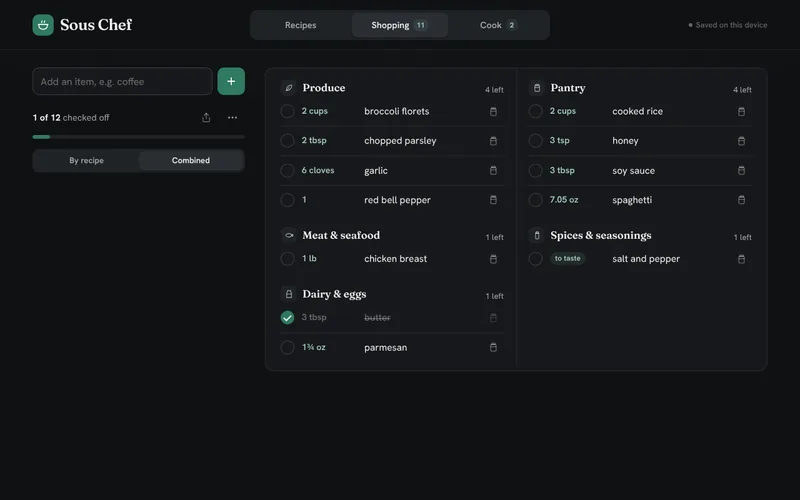
- One shopping list: ingredients scaled to your servings and merged across recipes, sorted by aisle, shown combined or grouped by recipe, and checked off as you shop. It skips what's already in your pantry, adds the things you buy every week, and rounds whole items up to what you'd actually buy.
- US or metric units, switched with one tap.
- Cook: each planned recipe's scaled ingredients beside its step-by-step directions, and a full-screen cook-along with timers.
- Recipes your way: tags, ratings and favorites, plus sharing, printing, and backing up or restoring your recipes.
- AI helpers: import a recipe from a web search, a link or a pasted ingredient list, plan a week for you, suggest what you can make from what you have, swap ingredients, and estimate nutrition and cost.
- Phone or desktop: an app-style single column on a phone; on a desktop, one header bar and a sidebar of controls beside the list on every tab, with less-used actions tucked into ⋯ menus.
How it's built
A single self-contained HTML page of plain JavaScript, with no dependencies. It's built as a Claude artifact: run inside Claude, recipes and the week's plan sync through the artifact's database, and the AI helpers use a model plus web search and fetch. Anywhere else, including the live demo, it saves to localStorage and everything but the AI works the same.
The live demo is built from the same artifact source by a short Python script, which wraps it in a page with the site's icons and a small script that adds a few sample recipes the first time it opens with nothing saved; a GitHub Actions workflow publishes it to GitHub Pages. Four Playwright suites drive the app in a real browser with the artifact's database and AI mocked, 273 checks in all, including phone and desktop layouts and one that fails if the sync fix below is removed.
Key decisions
Recipes as plain data
A recipe is a name, a base number of servings, a list of ingredients (amount, unit and name) and a list of steps. Scaling is one multiplication, and the combined list adds up ingredients whose name and unit match.
Converting through a base unit
Every weight is converted to grams and every volume to millilitres, then back into the most readable unit for the chosen system: under 15 ml shows as teaspoons, under 59 ml as tablespoons, then cups, quarts and gallons, and ounces become pounds at 16. So 48 teaspoons across three recipes shows up as 1 cup.
Update the list, don't rebuild it
Rebuilding the whole list on every tap replayed each row's entrance animation whenever you checked something off or changed a serving count. A keyed update patches the rows that are already there and only creates new ones, so only new items animate in.
Check-offs that belong to a recipe
Check-offs used to be stored by ingredient name and unit, so when two planned recipes both used garlic, ticking it in one ticked it in the other. Now each recipe's share of an item has its own check-off, and the combined row is ticked once every recipe's share is, and ticks or unticks them all. Lists saved before the change still show as ticked and split into per-recipe ticks the first time one changes, so nobody's list was lost. A regression test covers exactly that case and fails on the old code.
No lost check-offs while syncing
Changes to the week are saved to the database after a short 350 ms pause. Until a change has been sent and acknowledged, any copy the database sends back is older than what's on screen, so it's held until the save settles. Otherwise it could briefly undo newer check-offs, and the next one would be built on that stale copy.
Current limits
The AI helpers only work inside Claude, where the page can call a model and search the web. In the demo you type recipes in, nutrition and cost aren't estimated, and "Plan for me" picks from your own recipes without AI. Outside Claude, your recipes live in one browser.